 Glenn JocherandUltralyticsAssistant
e226f464bb
Glenn JocherandUltralyticsAssistant
e226f464bb
* Update README.zh-CN.md

Signed-off-by: Glenn Jocher <glenn.jocher@ultralytics.com>

* Auto-format by https://ultralytics.com/actions

---------

Signed-off-by: Glenn Jocher <glenn.jocher@ultralytics.com>
Co-authored-by: UltralyticsAssistant <web@ultralytics.com>
471 lines
43 KiB
Markdown
471 lines
43 KiB
Markdown
<div align="center">
|
||
<p>
|
||
<a href="https://www.ultralytics.com/blog/all-you-need-to-know-about-ultralytics-yolo11-and-its-applications" target="_blank">
|
||
<img width="100%" src="https://raw.githubusercontent.com/ultralytics/assets/main/yolov8/banner-yolov8.png" alt="Ultralytics YOLO 横幅"></a>
|
||
</p>
|
||
|
||
[中文](https://docs.ultralytics.com/zh) | [한국어](https://docs.ultralytics.com/ko) | [日本語](https://docs.ultralytics.com/ja) | [Русский](https://docs.ultralytics.com/ru) | [Deutsch](https://docs.ultralytics.com/de) | [Français](https://docs.ultralytics.com/fr) | [Español](https://docs.ultralytics.com/es) | [Português](https://docs.ultralytics.com/pt) | [Türkçe](https://docs.ultralytics.com/tr) | [Tiếng Việt](https://docs.ultralytics.com/vi) | [العربية](https://docs.ultralytics.com/ar)
|
||
|
||
<div>
|
||
<a href="https://github.com/ultralytics/yolov5/actions/workflows/ci-testing.yml"><img src="https://github.com/ultralytics/yolov5/actions/workflows/ci-testing.yml/badge.svg" alt="YOLOv5 CI"></a>
|
||
<a href="https://zenodo.org/badge/latestdoi/264818686"><img src="https://zenodo.org/badge/264818686.svg" alt="YOLOv5 Citation"></a>
|
||
<a href="https://hub.docker.com/r/ultralytics/yolov5"><img src="https://img.shields.io/docker/pulls/ultralytics/yolov5?logo=docker" alt="Docker Pulls"></a>
|
||
<a href="https://discord.com/invite/ultralytics"><img alt="Discord" src="https://img.shields.io/discord/1089800235347353640?logo=discord&logoColor=white&label=Discord&color=blue"></a> <a href="https://community.ultralytics.com/"><img alt="Ultralytics Forums" src="https://img.shields.io/discourse/users?server=https%3A%2F%2Fcommunity.ultralytics.com&logo=discourse&label=Forums&color=blue"></a> <a href="https://reddit.com/r/ultralytics"><img alt="Ultralytics Reddit" src="https://img.shields.io/reddit/subreddit-subscribers/ultralytics?style=flat&logo=reddit&logoColor=white&label=Reddit&color=blue"></a>
|
||
<br>
|
||
<a href="https://bit.ly/yolov5-paperspace-notebook"><img src="https://assets.paperspace.io/img/gradient-badge.svg" alt="Run on Gradient"></a>
|
||
<a href="https://colab.research.google.com/github/ultralytics/yolov5/blob/master/tutorial.ipynb"><img src="https://colab.research.google.com/assets/colab-badge.svg" alt="Open In Colab"></a>
|
||
<a href="https://www.kaggle.com/models/ultralytics/yolov5"><img src="https://kaggle.com/static/images/open-in-kaggle.svg" alt="Open In Kaggle"></a>
|
||
</div>
|
||
<br>
|
||
|
||
YOLOv5 🚀 是全球最受喜爱的视觉 AI,代表了 <a href="https://www.ultralytics.com/">Ultralytics</a> 在未来视觉 AI 方法上的开源研究成果,这些成果融合了经过数千小时研发的经验和最佳实践。
|
||
|
||
我们希望这里提供的资源能帮助您充分发挥 YOLOv5 的优势。请查阅 YOLOv5 的 <a href="https://docs.ultralytics.com/yolov5/">文档</a> 了解详情,如需支持请在 <a href="https://github.com/ultralytics/yolov5/issues/new/choose">GitHub</a> 上提交问题,或加入我们的 <a href="https://discord.com/invite/ultralytics">Discord</a> 社区进行提问和讨论!
|
||
|
||
若需申请企业许可证,请在 [Ultralytics Licensing](https://www.ultralytics.com/license) 完成相关表单。
|
||
|
||
<div align="center">
|
||
<a href="https://github.com/ultralytics"><img src="https://github.com/ultralytics/assets/raw/main/social/logo-social-github.png" width="2%" alt="Ultralytics GitHub"></a>
|
||
<img src="https://github.com/ultralytics/assets/raw/main/social/logo-transparent.png" width="2%">
|
||
<a href="https://www.linkedin.com/company/ultralytics/"><img src="https://github.com/ultralytics/assets/raw/main/social/logo-social-linkedin.png" width="2%" alt="Ultralytics LinkedIn"></a>
|
||
<img src="https://github.com/ultralytics/assets/raw/main/social/logo-transparent.png" width="2%">
|
||
<a href="https://twitter.com/ultralytics"><img src="https://github.com/ultralytics/assets/raw/main/social/logo-social-twitter.png" width="2%" alt="Ultralytics Twitter"></a>
|
||
<img src="https://github.com/ultralytics/assets/raw/main/social/logo-transparent.png" width="2%">
|
||
<a href="https://youtube.com/ultralytics?sub_confirmation=1"><img src="https://github.com/ultralytics/assets/raw/main/social/logo-social-youtube.png" width="2%" alt="Ultralytics YouTube"></a>
|
||
<img src="https://github.com/ultralytics/assets/raw/main/social/logo-transparent.png" width="2%">
|
||
<a href="https://www.tiktok.com/@ultralytics"><img src="https://github.com/ultralytics/assets/raw/main/social/logo-social-tiktok.png" width="2%" alt="Ultralytics TikTok"></a>
|
||
<img src="https://github.com/ultralytics/assets/raw/main/social/logo-transparent.png" width="2%">
|
||
<a href="https://ultralytics.com/bilibili"><img src="https://github.com/ultralytics/assets/raw/main/social/logo-social-bilibili.png" width="2%" alt="Ultralytics BiliBili"></a>
|
||
<img src="https://github.com/ultralytics/assets/raw/main/social/logo-transparent.png" width="2%">
|
||
<a href="https://discord.com/invite/ultralytics"><img src="https://github.com/ultralytics/assets/raw/main/social/logo-social-discord.png" width="2%" alt="Ultralytics Discord"></a>
|
||
</div>
|
||
|
||
</div>
|
||
<br>
|
||
|
||
## <div align="center">YOLO11 🚀 新品发布</div>
|
||
|
||
我们很高兴地宣布推出 Ultralytics YOLO11 🚀——我们最先进(SOTA)视觉模型的最新成果!现已在 **[GitHub](https://github.com/ultralytics/ultralytics)** 上发布,YOLO11 延续了我们在速度、准确性和易用性方面的优秀传统。不论您是处理目标检测、图像分割还是图像分类,YOLO11 都能提供多样应用场景下卓越的性能和灵活性。
|
||
|
||
今天就开始体验,释放 YOLO11 的全部潜力吧!请访问 [Ultralytics 文档](https://docs.ultralytics.com/) 获取全面的指南和资源:
|
||
|
||
[](https://badge.fury.io/py/ultralytics) [](https://www.pepy.tech/projects/ultralytics)
|
||
|
||
```bash
|
||
pip install ultralytics
|
||
```
|
||
|
||
<div align="center">
|
||
<a href="https://www.ultralytics.com/yolo" target="_blank">
|
||
<img width="100%" src="https://raw.githubusercontent.com/ultralytics/assets/refs/heads/main/yolo/performance-comparison.png"></a>
|
||
</div>
|
||
|
||
## <div align="center">文档</div>
|
||
|
||
请参阅 [YOLOv5 文档](https://docs.ultralytics.com/yolov5/) 获取关于训练、测试和部署的完整指南。下方提供了快速入门示例。
|
||
|
||
<details open>
|
||
<summary>安装</summary>
|
||
|
||
克隆仓库并在 [**Python>=3.8.0**](https://www.python.org/) 环境中安装 [requirements.txt](https://github.com/ultralytics/yolov5/blob/master/requirements.txt) 文件中的依赖,包括 [**PyTorch>=1.8**](https://pytorch.org/get-started/locally/)。
|
||
|
||
```bash
|
||
git clone https://github.com/ultralytics/yolov5 # 克隆仓库
|
||
cd yolov5
|
||
pip install -r requirements.txt # 安装依赖
|
||
```
|
||
|
||
</details>
|
||
|
||
<details open>
|
||
<summary>推理</summary>
|
||
|
||
YOLOv5 [PyTorch Hub](https://docs.ultralytics.com/yolov5/tutorials/pytorch_hub_model_loading/) 推理示例。[Models](https://github.com/ultralytics/yolov5/tree/master/models) 会自动从最新的 YOLOv5 [发行版](https://github.com/ultralytics/yolov5/releases) 下载。
|
||
|
||
```python
|
||
import torch
|
||
|
||
# 加载 YOLOv5 模型(可选:yolov5n, yolov5s, yolov5m, yolov5l, yolov5x)
|
||
model = torch.hub.load("ultralytics/yolov5", "yolov5s")
|
||
|
||
# 输入源(URL、文件、PIL、OpenCV、numpy 数组或列表)
|
||
img = "https://ultralytics.com/images/zidane.jpg"
|
||
|
||
# 执行推理(自动处理批量、调整大小、归一化)
|
||
results = model(img)
|
||
|
||
# 处理结果(可选:.print(), .show(), .save(), .crop(), .pandas())
|
||
results.print()
|
||
```
|
||
|
||
</details>
|
||
|
||
<details>
|
||
<summary>使用 detect.py 进行推理</summary>
|
||
|
||
`detect.py` 在多种来源上运行推理,自动从最新的 YOLOv5 [发行版](https://github.com/ultralytics/yolov5/releases) 下载 [models](https://github.com/ultralytics/yolov5/tree/master/models),并将结果保存至 `runs/detect`。
|
||
|
||
```bash
|
||
python detect.py --weights yolov5s.pt --source 0 # 摄像头
|
||
python detect.py --weights yolov5s.pt --source img.jpg # 图片
|
||
python detect.py --weights yolov5s.pt --source vid.mp4 # 视频
|
||
python detect.py --weights yolov5s.pt --source screen # 截图
|
||
python detect.py --weights yolov5s.pt --source path/ # 目录
|
||
python detect.py --weights yolov5s.pt --source list.txt # 图片列表
|
||
python detect.py --weights yolov5s.pt --source list.streams # 流列表
|
||
python detect.py --weights yolov5s.pt --source 'path/*.jpg' # glob 通配符
|
||
python detect.py --weights yolov5s.pt --source 'https://youtu.be/LNwODJXcvt4' # YouTube
|
||
python detect.py --weights yolov5s.pt --source 'rtsp://example.com/media.mp4' # RTSP, RTMP, HTTP 流
|
||
```
|
||
|
||
</details>
|
||
|
||
<details>
|
||
<summary>训练</summary>
|
||
|
||
以下命令重现了 YOLOv5 [COCO](https://github.com/ultralytics/yolov5/blob/master/data/scripts/get_coco.sh) 数据集的结果。[Models](https://github.com/ultralytics/yolov5/tree/master/models) 和 [datasets](https://github.com/ultralytics/yolov5/tree/master/data) 会自动从最新的 YOLOv5 [发行版](https://github.com/ultralytics/yolov5/releases) 下载。使用 V100 GPU 训练 YOLOv5n/s/m/l/x 的时间分别为 1/2/4/6/8 天([多 GPU](https://docs.ultralytics.com/yolov5/tutorials/multi_gpu_training/) 可大幅加快训练速度)。建议使用最大的 `--batch-size`,或传入 `--batch-size -1` 以使用 YOLOv5 [AutoBatch](https://github.com/ultralytics/yolov5/pull/5092)。下面显示的批量大小基于 V100-16GB。
|
||
|
||
```bash
|
||
python train.py --data coco.yaml --epochs 300 --weights '' --cfg yolov5n.yaml --batch-size 128
|
||
python train.py --data coco.yaml --epochs 300 --weights '' --cfg yolov5s.yaml --batch-size 64
|
||
python train.py --data coco.yaml --epochs 300 --weights '' --cfg yolov5m.yaml --batch-size 40
|
||
python train.py --data coco.yaml --epochs 300 --weights '' --cfg yolov5l.yaml --batch-size 24
|
||
python train.py --data coco.yaml --epochs 300 --weights '' --cfg yolov5x.yaml --batch-size 16
|
||
```
|
||
|
||
<img width="800" src="https://user-images.githubusercontent.com/26833433/90222759-949d8800-ddc1-11ea-9fa1-1c97eed2b963.png">
|
||
|
||
</details>
|
||
|
||
<details open>
|
||
<summary>教程</summary>
|
||
|
||
- [训练自定义数据](https://docs.ultralytics.com/yolov5/tutorials/train_custom_data/) 🚀 强烈推荐
|
||
- [获得最佳训练效果的技巧](https://docs.ultralytics.com/guides/model-training-tips/) ☘️
|
||
- [多 GPU 训练](https://docs.ultralytics.com/yolov5/tutorials/multi_gpu_training/)
|
||
- [PyTorch Hub](https://docs.ultralytics.com/yolov5/tutorials/pytorch_hub_model_loading/) 🌟 新版
|
||
- [TFLite, ONNX, CoreML, TensorRT 导出](https://docs.ultralytics.com/yolov5/tutorials/model_export/) 🚀
|
||
- [NVIDIA Jetson 平台部署](https://docs.ultralytics.com/yolov5/tutorials/running_on_jetson_nano/) 🌟 新版
|
||
- [测试时数据增强 (TTA)](https://docs.ultralytics.com/yolov5/tutorials/test_time_augmentation/)
|
||
- [模型集成](https://docs.ultralytics.com/yolov5/tutorials/model_ensembling/)
|
||
- [模型修剪/稀疏](https://docs.ultralytics.com/yolov5/tutorials/model_pruning_and_sparsity/)
|
||
- [超参数进化](https://docs.ultralytics.com/yolov5/tutorials/hyperparameter_evolution/)
|
||
- [冻结层进行迁移学习](https://docs.ultralytics.com/yolov5/tutorials/transfer_learning_with_frozen_layers/)
|
||
- [架构概述](https://docs.ultralytics.com/yolov5/tutorials/architecture_description/) 🌟 新版
|
||
- [Ultralytics HUB 进行训练和部署 YOLO](https://www.ultralytics.com/hub) 🚀 强烈推荐
|
||
- [ClearML 日志记录](https://docs.ultralytics.com/yolov5/tutorials/clearml_logging_integration/)
|
||
- [YOLOv5 与 Neural Magic 的 Deepsparse](https://docs.ultralytics.com/yolov5/tutorials/neural_magic_pruning_quantization/)
|
||
- [Comet 日志记录](https://docs.ultralytics.com/yolov5/tutorials/comet_logging_integration/) 🌟 新版
|
||
|
||
</details>
|
||
|
||
## <div align="center">集成</div>
|
||
|
||
我们与领先 AI 平台的深度集成拓展了 Ultralytics 解决方案的功能,提升了数据集标注、训练、可视化和模型管理等任务的效率。了解 Ultralytics 如何与 [W&B](https://docs.wandb.ai/guides/integrations/ultralytics/)、[Comet](https://bit.ly/yolov8-readme-comet)、[Roboflow](https://roboflow.com/?ref=ultralytics) 以及 [OpenVINO](https://docs.ultralytics.com/integrations/openvino/) 合作,优化您的 AI 工作流程。
|
||
|
||
<br>
|
||
<a href="https://www.ultralytics.com/hub" target="_blank">
|
||
<img width="100%" src="https://github.com/ultralytics/assets/raw/main/yolov8/banner-integrations.png" alt="Ultralytics 主动学习集成"></a>
|
||
<br>
|
||
<br>
|
||
|
||
<div align="center">
|
||
<a href="https://www.ultralytics.com/hub">
|
||
<img src="https://github.com/ultralytics/assets/raw/main/partners/logo-ultralytics-hub.png" width="10%" alt="Ultralytics HUB logo"></a>
|
||
<img src="https://github.com/ultralytics/assets/raw/main/social/logo-transparent.png" width="15%" height="0" alt="space">
|
||
<a href="https://docs.wandb.ai/guides/integrations/ultralytics/">
|
||
<img src="https://github.com/ultralytics/assets/raw/main/partners/logo-wb.png" width="10%" alt="Weights & Biases logo"></a>
|
||
<img src="https://github.com/ultralytics/assets/raw/main/social/logo-transparent.png" width="15%" height="0" alt="space">
|
||
<a href="https://bit.ly/yolov8-readme-comet">
|
||
<img src="https://github.com/ultralytics/assets/raw/main/partners/logo-comet.png" width="10%" alt="Comet ML logo"></a>
|
||
<img src="https://github.com/ultralytics/assets/raw/main/social/logo-transparent.png" width="15%" height="0" alt="space">
|
||
<a href="https://bit.ly/yolov5-neuralmagic">
|
||
<img src="https://github.com/ultralytics/assets/raw/main/partners/logo-neuralmagic.png" width="10%" alt="NeuralMagic logo"></a>
|
||
</div>
|
||
|
||
| Ultralytics HUB 🚀 | W&B | Comet ⭐ 新版 | Neural Magic |
|
||
| :----------------------------------------------------------------------------------------------------------: | :------------------------------------------------------------------------------------------------------: | :--------------------------------------------------------------------------------------------------------------------: | :-------------------------------------------------------------------------------------------------: |
|
||
| 简化 YOLO 工作流程:使用 [Ultralytics HUB](https://www.ultralytics.com/hub) 轻松标注、训练和部署。立即体验! | 使用 [Weights & Biases](https://docs.wandb.ai/guides/integrations/ultralytics/) 跟踪实验、超参数和结果。 | 永久免费,[Comet](https://bit.ly/yolov5-readme-comet) 允许您保存 YOLOv5 模型、恢复训练,并以交互方式可视化和调试预测。 | 使用 [Neural Magic DeepSparse](https://bit.ly/yolov5-neuralmagic) 使 YOLO11 推理速度提升最高 6 倍。 |
|
||
|
||
## <div align="center">Ultralytics HUB</div>
|
||
|
||
体验无缝 AI 体验,使用 [Ultralytics HUB](https://www.ultralytics.com/hub) ⭐ ——这是一个无需编写代码即可进行数据可视化、YOLOv5 与 YOLOv8 🚀 模型训练和部署的一体化解决方案。借助我们前沿的平台和用户友好的 [Ultralytics App](https://www.ultralytics.com/app-install),您能轻松将图像转化为可操作的洞察并让您的 AI 创想成真。立即开始您的【免费】之旅吧!
|
||
|
||
<a align="center" href="https://www.ultralytics.com/hub" target="_blank">
|
||
<img width="100%" src="https://github.com/ultralytics/assets/raw/main/im/ultralytics-hub.png"></a>
|
||
|
||
## <div align="center">为何选择 YOLOv5</div>
|
||
|
||
YOLOv5 的设计初衷是让入门变得极为简单且易于学习。我们专注于真实世界的结果。
|
||
|
||
<p align="left"><img width="800" src="https://user-images.githubusercontent.com/26833433/155040763-93c22a27-347c-4e3c-847a-8094621d3f4e.png"></p>
|
||
<details>
|
||
<summary>YOLOv5-P5 640 图示</summary>
|
||
|
||
<p align="left"><img width="800" src="https://user-images.githubusercontent.com/26833433/155040757-ce0934a3-06a6-43dc-a979-2edbbd69ea0e.png"></p>
|
||
</details>
|
||
<details>
|
||
<summary>图示说明</summary>
|
||
|
||
- **COCO AP val** 表示在 5000 张 [COCO val2017](http://cocodataset.org) 图像数据集上、推理尺寸从 256 到 1536 不同情况下测量的 mAP@0.5:0.95 指标。
|
||
- **GPU Speed** 测量在 [COCO val2017](http://cocodataset.org) 数据集上使用 [AWS p3.2xlarge](https://aws.amazon.com/ec2/instance-types/p4/) V100 实例,以批量大小 32 计算的平均每张图推理时间。
|
||
- **EfficientDet** 数据来自 [google/automl](https://github.com/google/automl),批量大小为 8。
|
||
- **重现** 命令:`python val.py --task study --data coco.yaml --iou 0.7 --weights yolov5n6.pt yolov5s6.pt yolov5m6.pt yolov5l6.pt yolov5x6.pt`
|
||
|
||
</details>
|
||
|
||
### 预训练检查点
|
||
|
||
| Model | size<br><sup>(pixels) | mAP<sup>val<br>50-95 | mAP<sup>val<br>50 | Speed<br><sup>CPU b1<br>(ms) | Speed<br><sup>V100 b1<br>(ms) | Speed<br><sup>V100 b32<br>(ms) | params<br><sup>(M) | FLOPs<br><sup>@640 (B) |
|
||
| ----------------------------------------------------------------------------------------------- | --------------------- | -------------------- | ----------------- | ---------------------------- | ----------------------------- | ------------------------------ | ------------------ | ---------------------- |
|
||
| [YOLOv5n](https://github.com/ultralytics/yolov5/releases/download/v7.0/yolov5n.pt) | 640 | 28.0 | 45.7 | **45** | **6.3** | **0.6** | **1.9** | **4.5** |
|
||
| [YOLOv5s](https://github.com/ultralytics/yolov5/releases/download/v7.0/yolov5s.pt) | 640 | 37.4 | 56.8 | 98 | 6.4 | 0.9 | 7.2 | 16.5 |
|
||
| [YOLOv5m](https://github.com/ultralytics/yolov5/releases/download/v7.0/yolov5m.pt) | 640 | 45.4 | 64.1 | 224 | 8.2 | 1.7 | 21.2 | 49.0 |
|
||
| [YOLOv5l](https://github.com/ultralytics/yolov5/releases/download/v7.0/yolov5l.pt) | 640 | 49.0 | 67.3 | 430 | 10.1 | 2.7 | 46.5 | 109.1 |
|
||
| [YOLOv5x](https://github.com/ultralytics/yolov5/releases/download/v7.0/yolov5x.pt) | 640 | 50.7 | 68.9 | 766 | 12.1 | 4.8 | 86.7 | 205.7 |
|
||
| | | | | | | | | |
|
||
| [YOLOv5n6](https://github.com/ultralytics/yolov5/releases/download/v7.0/yolov5n6.pt) | 1280 | 36.0 | 54.4 | 153 | 8.1 | 2.1 | 3.2 | 4.6 |
|
||
| [YOLOv5s6](https://github.com/ultralytics/yolov5/releases/download/v7.0/yolov5s6.pt) | 1280 | 44.8 | 63.7 | 385 | 8.2 | 3.6 | 12.6 | 16.8 |
|
||
| [YOLOv5m6](https://github.com/ultralytics/yolov5/releases/download/v7.0/yolov5m6.pt) | 1280 | 51.3 | 69.3 | 887 | 11.1 | 6.8 | 35.7 | 50.0 |
|
||
| [YOLOv5l6](https://github.com/ultralytics/yolov5/releases/download/v7.0/yolov5l6.pt) | 1280 | 53.7 | 71.3 | 1784 | 15.8 | 10.5 | 76.8 | 111.4 |
|
||
| [YOLOv5x6](https://github.com/ultralytics/yolov5/releases/download/v7.0/yolov5x6.pt)<br>+ [TTA] | 1280<br>1536 | 55.0<br>**55.8** | 72.7<br>**72.7** | 3136<br>- | 26.2<br>- | 19.4<br>- | 140.7<br>- | 209.8<br>- |
|
||
|
||
<details>
|
||
<summary>表格说明</summary>
|
||
|
||
- 所有检查点均使用默认设置训练 300 个周期。Nano 与 Small 模型使用 [hyp.scratch-low.yaml](https://github.com/ultralytics/yolov5/blob/master/data/hyps/hyp.scratch-low.yaml) 超参数,其它模型使用 [hyp.scratch-high.yaml](https://github.com/ultralytics/yolov5/blob/master/data/hyps/hyp.scratch-high.yaml)。
|
||
- **mAP<sup>val</sup>** 指标为在 [COCO val2017](http://cocodataset.org) 数据集上单模型单尺度计算的结果。<br>重现命令:`python val.py --data coco.yaml --img 640 --conf 0.001 --iou 0.65`
|
||
- **Speed** 为在 [AWS p3.2xlarge](https://aws.amazon.com/ec2/instance-types/p4/) 实例中基于 COCO val 图像平均推理时间(批量为 1)。不包含 NMS 时间(约 1 ms/图)。<br>重现命令:`python val.py --data coco.yaml --img 640 --task speed --batch 1`
|
||
- **TTA** [测试时数据增强](https://docs.ultralytics.com/yolov5/tutorials/test_time_augmentation/) 包括反射翻转和缩放增强。<br>重现命令:`python val.py --data coco.yaml --img 1536 --iou 0.7 --augment`
|
||
|
||
</details>
|
||
|
||
## <div align="center">分割</div>
|
||
|
||
我们全新推出的 YOLOv5 [release v7.0](https://github.com/ultralytics/yolov5/releases/v7.0) 实例分割模型是目前全球最快且最精准的,其性能超越了所有现有 [SOTA 基准](https://paperswithcode.com/sota/real-time-instance-segmentation-on-mscoco)。我们将其训练、验证和部署过程简化到了极致。详细信息请参阅我们的 [发行说明](https://github.com/ultralytics/yolov5/releases/v7.0) ,同时访问我们的 [YOLOv5 分割 Colab Notebook](https://github.com/ultralytics/yolov5/blob/master/segment/tutorial.ipynb) 获取快速入门教程。
|
||
|
||
<details>
|
||
<summary>分割检查点</summary>
|
||
|
||
<div align="center">
|
||
<a align="center" href="https://www.ultralytics.com/yolo" target="_blank">
|
||
<img width="800" src="https://user-images.githubusercontent.com/61612323/204180385-84f3aca9-a5e9-43d8-a617-dda7ca12e54a.png"></a>
|
||
</div>
|
||
|
||
我们在 A100 GPU 上以图像尺寸 640 对 COCO 数据集训练了 YOLOv5 分割模型共 300 个周期。我们将所有模型导出为 ONNX FP32 以进行 CPU 速度测试,及 TensorRT FP16 以进行 GPU 速度测试。所有速度测试均在 Google [Colab Pro](https://colab.research.google.com/signup) 笔记本上进行,以便于结果重现。
|
||
|
||
| Model | size<br><sup>(pixels) | mAP<sup>box<br>50-95 | mAP<sup>mask<br>50-95 | Train time<br><sup>300 epochs<br>A100 (hours) | Speed<br><sup>ONNX CPU<br>(ms) | Speed<br><sup>TRT A100<br>(ms) | params<br><sup>(M) | FLOPs<br><sup>@640 (B) |
|
||
| ------------------------------------------------------------------------------------------ | --------------------- | -------------------- | --------------------- | --------------------------------------------- | ------------------------------ | ------------------------------ | ------------------ | ---------------------- |
|
||
| [YOLOv5n-seg](https://github.com/ultralytics/yolov5/releases/download/v7.0/yolov5n-seg.pt) | 640 | 27.6 | 23.4 | 80:17 | **62.7** | **1.2** | **2.0** | **7.1** |
|
||
| [YOLOv5s-seg](https://github.com/ultralytics/yolov5/releases/download/v7.0/yolov5s-seg.pt) | 640 | 37.6 | 31.7 | 88:16 | 173.3 | 1.4 | 7.6 | 26.4 |
|
||
| [YOLOv5m-seg](https://github.com/ultralytics/yolov5/releases/download/v7.0/yolov5m-seg.pt) | 640 | 45.0 | 37.1 | 108:36 | 427.0 | 2.2 | 22.0 | 70.8 |
|
||
| [YOLOv5l-seg](https://github.com/ultralytics/yolov5/releases/download/v7.0/yolov5l-seg.pt) | 640 | 49.0 | 39.9 | 66:43 (2x) | 857.4 | 2.9 | 47.9 | 147.7 |
|
||
| [YOLOv5x-seg](https://github.com/ultralytics/yolov5/releases/download/v7.0/yolov5x-seg.pt) | 640 | **50.7** | **41.4** | 62:56 (3x) | 1579.2 | 4.5 | 88.8 | 265.7 |
|
||
|
||
- 所有检查点均使用 SGD 优化器(`lr0=0.01`,`weight_decay=5e-5`)以图像尺寸 640 训练 300 个周期,且均采用默认设置。<br>训练日志记录于 https://wandb.ai/glenn-jocher/YOLOv5_v70_official
|
||
- **准确度** 为在 COCO 数据集上单模型单尺度的结果。<br>重现命令:`python segment/val.py --data coco.yaml --weights yolov5s-seg.pt`
|
||
- **速度** 为在 Google [Colab Pro](https://colab.research.google.com/signup) A100 高内存实例上,针对 100 张推理图像计算的平均推理速度。数值仅表示推理速度(NMS 每图约增加 1ms)。<br>重现命令:`python segment/val.py --data coco.yaml --weights yolov5s-seg.pt --batch 1`
|
||
- **导出** 为 ONNX FP32 及 TensorRT FP16 均通过 `export.py` 执行。<br>重现命令:`python export.py --weights yolov5s-seg.pt --include engine --device 0 --half`
|
||
|
||
</details>
|
||
|
||
<details>
|
||
<summary>分割使用示例 <a href="https://colab.research.google.com/github/ultralytics/yolov5/blob/master/segment/tutorial.ipynb"><img src="https://colab.research.google.com/assets/colab-badge.svg" alt="Open In Colab"></a></summary>
|
||
|
||
### 训练
|
||
|
||
YOLOv5 分割训练支持通过 `--data coco128-seg.yaml` 参数自动下载 COCO128-seg 分割数据集,也支持通过执行 `bash data/scripts/get_coco.sh --train --val --segments` 手动下载 COCO-segments 数据集,然后运行 `python train.py --data coco.yaml`。
|
||
|
||
```bash
|
||
# 单 GPU 训练
|
||
python segment/train.py --data coco128-seg.yaml --weights yolov5s-seg.pt --img 640
|
||
|
||
# 多 GPU DDP 训练
|
||
python -m torch.distributed.run --nproc_per_node 4 --master_port 1 segment/train.py --data coco128-seg.yaml --weights yolov5s-seg.pt --img 640 --device 0,1,2,3
|
||
```
|
||
|
||
### 验证
|
||
|
||
在 COCO 数据集上验证 YOLOv5s-seg 的 mask mAP:
|
||
|
||
```bash
|
||
bash data/scripts/get_coco.sh --val --segments # 下载 COCO val 分割集(780MB,5000 张图)
|
||
python segment/val.py --weights yolov5s-seg.pt --data coco.yaml --img 640 # 验证
|
||
```
|
||
|
||
### 预测
|
||
|
||
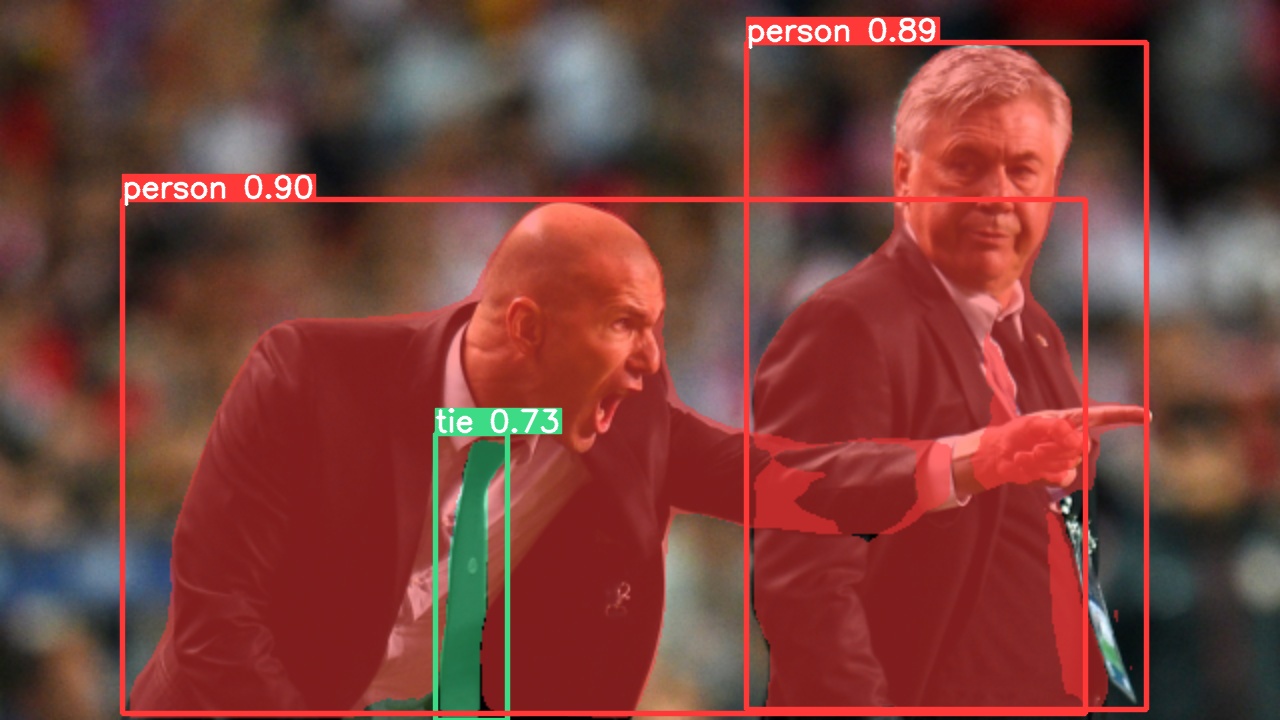
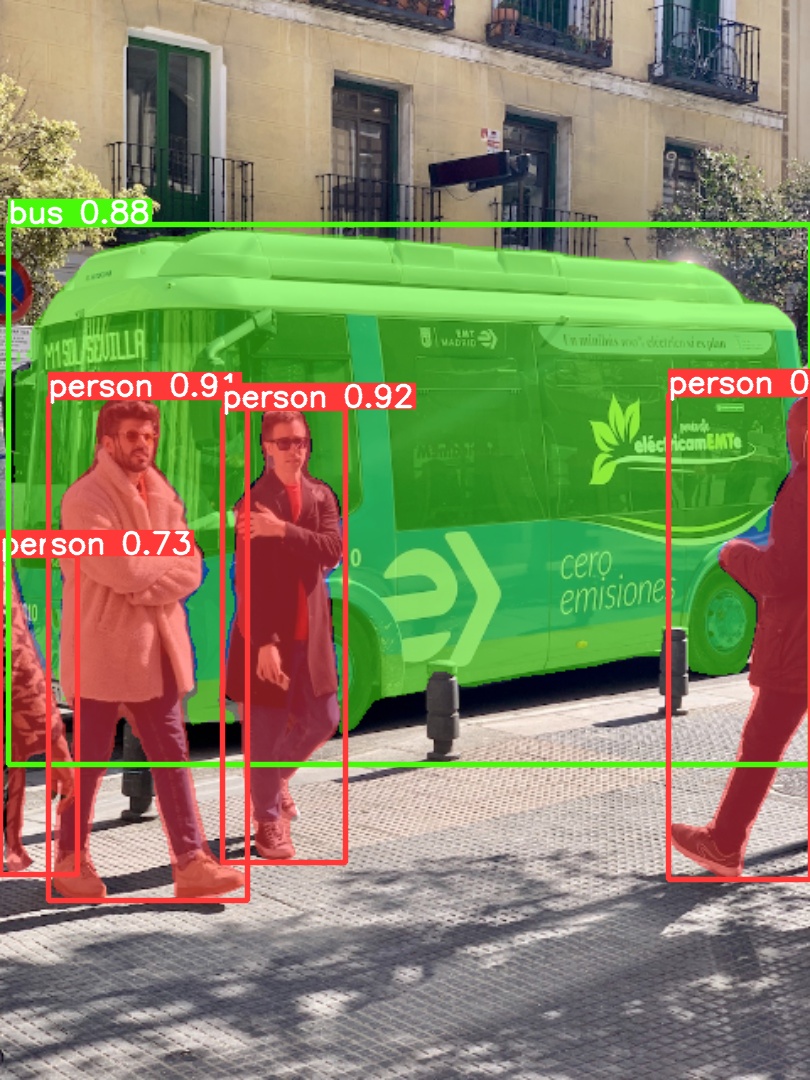
使用预训练的 YOLOv5m-seg.pt 对 bus.jpg 进行预测:
|
||
|
||
```bash
|
||
python segment/predict.py --weights yolov5m-seg.pt --source data/images/bus.jpg
|
||
```
|
||
|
||
```python
|
||
model = torch.hub.load(
|
||
"ultralytics/yolov5", "custom", "yolov5m-seg.pt"
|
||
) # 从 PyTorch Hub 加载(注意:目前推理尚未支持)
|
||
```
|
||
|
||
|  |  |
|
||
| ---------------------------------------------------------------------------------------------------------------- | ------------------------------------------------------------------------------------------------------------- |
|
||
|
||
### 导出
|
||
|
||
将 YOLOv5s-seg 模型导出为 ONNX 与 TensorRT 格式:
|
||
|
||
```bash
|
||
python export.py --weights yolov5s-seg.pt --include onnx engine --img 640 --device 0
|
||
```
|
||
|
||
</details>
|
||
|
||
## <div align="center">分类</div>
|
||
|
||
YOLOv5 [release v6.2](https://github.com/ultralytics/yolov5/releases) 新增了对分类模型的训练、验证和部署支持!详细信息请参阅我们的 [发行说明](https://github.com/ultralytics/yolov5/releases/v6.2) ,同时访问我们的 [YOLOv5 分类 Colab Notebook](https://github.com/ultralytics/yolov5/blob/master/classify/tutorial.ipynb) 获取快速入门教程。
|
||
|
||
<details>
|
||
<summary>分类检查点</summary>
|
||
|
||
<br>
|
||
|
||
我们在 ImageNet 数据集上训练了 YOLOv5-cls 分类模型,共训练 90 个周期,使用 4 个 A100 实例进行训练。同时为了对比,我们还训练了 ResNet 和 EfficientNet 模型,均采用相同的默认训练设置。所有模型均导出为 ONNX FP32 以进行 CPU 速度测试,并导出为 TensorRT FP16 以进行 GPU 速度测试。所有速度测试均在 Google [Colab Pro](https://colab.research.google.com/signup) 上进行,以方便结果重现。
|
||
|
||
| Model | size<br><sup>(pixels) | acc<br><sup>top1 | acc<br><sup>top5 | Training<br><sup>90 epochs<br>4xA100 (hours) | Speed<br><sup>ONNX CPU<br>(ms) | Speed<br><sup>TensorRT V100<br>(ms) | params<br><sup>(M) | FLOPs<br><sup>@224 (B) |
|
||
| -------------------------------------------------------------------------------------------------- | --------------------- | ---------------- | ---------------- | -------------------------------------------- | ------------------------------ | ----------------------------------- | ------------------ | ---------------------- |
|
||
| [YOLOv5n-cls](https://github.com/ultralytics/yolov5/releases/download/v7.0/yolov5n-cls.pt) | 224 | 64.6 | 85.4 | 7:59 | **3.3** | **0.5** | **2.5** | **0.5** |
|
||
| [YOLOv5s-cls](https://github.com/ultralytics/yolov5/releases/download/v7.0/yolov5s-cls.pt) | 224 | 71.5 | 90.2 | 8:09 | 6.6 | 0.6 | 5.4 | 1.4 |
|
||
| [YOLOv5m-cls](https://github.com/ultralytics/yolov5/releases/download/v7.0/yolov5m-cls.pt) | 224 | 75.9 | 92.9 | 10:06 | 15.5 | 0.9 | 12.9 | 3.9 |
|
||
| [YOLOv5l-cls](https://github.com/ultralytics/yolov5/releases/download/v7.0/yolov5l-cls.pt) | 224 | 78.0 | 94.0 | 11:56 | 26.9 | 1.4 | 26.5 | 8.5 |
|
||
| [YOLOv5x-cls](https://github.com/ultralytics/yolov5/releases/download/v7.0/yolov5x-cls.pt) | 224 | **79.0** | **94.4** | 15:04 | 54.3 | 1.8 | 48.1 | 15.9 |
|
||
| | | | | | | | | |
|
||
| [ResNet18](https://github.com/ultralytics/yolov5/releases/download/v7.0/resnet18.pt) | 224 | 70.3 | 89.5 | **6:47** | 11.2 | 0.5 | 11.7 | 3.7 |
|
||
| [ResNet34](https://github.com/ultralytics/yolov5/releases/download/v7.0/resnet34.pt) | 224 | 73.9 | 91.8 | 8:33 | 20.6 | 0.9 | 21.8 | 7.4 |
|
||
| [ResNet50](https://github.com/ultralytics/yolov5/releases/download/v7.0/resnet50.pt) | 224 | 76.8 | 93.4 | 11:10 | 23.4 | 1.0 | 25.6 | 8.5 |
|
||
| [ResNet101](https://github.com/ultralytics/yolov5/releases/download/v7.0/resnet101.pt) | 224 | 78.5 | 94.3 | 17:10 | 42.1 | 1.9 | 44.5 | 15.9 |
|
||
| | | | | | | | | |
|
||
| [EfficientNet_b0](https://github.com/ultralytics/yolov5/releases/download/v7.0/efficientnet_b0.pt) | 224 | 75.1 | 92.4 | 13:03 | 12.5 | 1.3 | 5.3 | 1.0 |
|
||
| [EfficientNet_b1](https://github.com/ultralytics/yolov5/releases/download/v7.0/efficientnet_b1.pt) | 224 | 76.4 | 93.2 | 17:04 | 14.9 | 1.6 | 7.8 | 1.5 |
|
||
| [EfficientNet_b2](https://github.com/ultralytics/yolov5/releases/download/v7.0/efficientnet_b2.pt) | 224 | 76.6 | 93.4 | 17:10 | 15.9 | 1.6 | 9.1 | 1.7 |
|
||
| [EfficientNet_b3](https://github.com/ultralytics/yolov5/releases/download/v7.0/efficientnet_b3.pt) | 224 | 77.7 | 94.0 | 19:19 | 18.9 | 1.9 | 12.2 | 2.4 |
|
||
|
||
<details>
|
||
<summary>表格说明 (点击展开)</summary>
|
||
|
||
- 所有检查点均使用默认设置,在图像尺寸 224 下以 SGD 优化器(`lr0=0.001`,`weight_decay=5e-5`)训练 90 个周期。训练日志记录于 https://wandb.ai/glenn-jocher/YOLOv5-Classifier-v6-2
|
||
- **准确率** 为在 [ImageNet-1k](https://www.image-net.org/index.php) 数据集上单模型单尺度计算的结果。<br>重现命令:`python classify/val.py --data ../datasets/imagenet --img 224`
|
||
- **速度** 为在 Google [Colab Pro](https://colab.research.google.com/signup) V100 高内存实例上,针对 100 张推理图像计算的平均推理速度。<br>重现命令:`python classify/val.py --data ../datasets/imagenet --img 224 --batch 1`
|
||
- **导出** 为 ONNX FP32 及 TensorRT FP16 均通过 `export.py` 执行。<br>重现命令:`python export.py --weights yolov5s-cls.pt --include engine onnx --imgsz 224`
|
||
|
||
</details>
|
||
</details>
|
||
|
||
<details>
|
||
<summary>分类使用示例 <a href="https://colab.research.google.com/github/ultralytics/yolov5/blob/master/classify/tutorial.ipynb"><img src="https://colab.research.google.com/assets/colab-badge.svg" alt="Open In Colab"></a></summary>
|
||
|
||
### 训练
|
||
|
||
YOLOv5 分类训练支持通过 `--data` 参数自动下载 MNIST、Fashion-MNIST、CIFAR10、CIFAR100、Imagenette、Imagewoof 和 ImageNet 数据集。例如,启动 MNIST 训练只需使用 `--data mnist`。
|
||
|
||
```bash
|
||
# 单 GPU 训练
|
||
python classify/train.py --model yolov5s-cls.pt --data cifar100 --epochs 5 --img 224 --batch 128
|
||
|
||
# 多 GPU DDP 训练
|
||
python -m torch.distributed.run --nproc_per_node 4 --master_port 1 classify/train.py --model yolov5s-cls.pt --data imagenet --epochs 5 --img 224 --device 0,1,2,3
|
||
```
|
||
|
||
### 验证
|
||
|
||
在 ImageNet-1k 数据集上验证 YOLOv5m-cls 的准确率:
|
||
|
||
```bash
|
||
bash data/scripts/get_imagenet.sh --val # 下载 ImageNet 验证集(6.3G,50000 张图)
|
||
python classify/val.py --weights yolov5m-cls.pt --data ../datasets/imagenet --img 224 # 验证
|
||
```
|
||
|
||
### 预测
|
||
|
||
使用预训练的 YOLOv5s-cls.pt 对 bus.jpg 进行预测:
|
||
|
||
```bash
|
||
python classify/predict.py --weights yolov5s-cls.pt --source data/images/bus.jpg
|
||
```
|
||
|
||
```python
|
||
model = torch.hub.load("ultralytics/yolov5", "custom", "yolov5s-cls.pt") # 从 PyTorch Hub 加载
|
||
```
|
||
|
||
### 导出
|
||
|
||
将一组训练好的 YOLOv5s-cls、ResNet 和 EfficientNet 模型导出为 ONNX 与 TensorRT 格式:
|
||
|
||
```bash
|
||
python export.py --weights yolov5s-cls.pt resnet50.pt efficientnet_b0.pt --include onnx engine --img 224
|
||
```
|
||
|
||
</details>
|
||
|
||
## <div align="center">环境</div>
|
||
|
||
只需几秒钟即可开始使用我们的经过验证的环境。点击下方每个图标了解详情。
|
||
|
||
<div align="center">
|
||
<a href="https://bit.ly/yolov5-paperspace-notebook">
|
||
<img src="https://github.com/ultralytics/assets/releases/download/v0.0.0/logo-gradient.png" width="10%" /></a>
|
||
<img src="https://github.com/ultralytics/assets/raw/main/social/logo-transparent.png" width="5%" alt="" />
|
||
<a href="https://colab.research.google.com/github/ultralytics/yolov5/blob/master/tutorial.ipynb">
|
||
<img src="https://github.com/ultralytics/assets/releases/download/v0.0.0/logo-colab-small.png" width="10%" /></a>
|
||
<img src="https://github.com/ultralytics/assets/raw/main/social/logo-transparent.png" width="5%" alt="" />
|
||
<a href="https://www.kaggle.com/models/ultralytics/yolov5">
|
||
<img src="https://github.com/ultralytics/assets/releases/download/v0.0.0/logo-kaggle-small.png" width="10%" /></a>
|
||
<img src="https://github.com/ultralytics/assets/raw/main/social/logo-transparent.png" width="5%" alt="" />
|
||
<a href="https://hub.docker.com/r/ultralytics/yolov5">
|
||
<img src="https://github.com/ultralytics/assets/releases/download/v0.0.0/logo-docker-small.png" width="10%" /></a>
|
||
<img src="https://github.com/ultralytics/assets/raw/main/social/logo-transparent.png" width="5%" alt="" />
|
||
<a href="https://docs.ultralytics.com/yolov5/environments/aws_quickstart_tutorial/">
|
||
<img src="https://github.com/ultralytics/assets/releases/download/v0.0.0/logo-aws-small.png" width="10%" /></a>
|
||
<img src="https://github.com/ultralytics/assets/raw/main/social/logo-transparent.png" width="5%" alt="" />
|
||
<a href="https://docs.ultralytics.com/yolov5/environments/google_cloud_quickstart_tutorial/">
|
||
<img src="https://github.com/ultralytics/assets/releases/download/v0.0.0/logo-gcp-small.png" width="10%" /></a>
|
||
</div>
|
||
|
||
## <div align="center">贡献</div>
|
||
|
||
我们非常欢迎您的反馈!我们希望让贡献 YOLOv5 的过程变得简单且透明。请参阅我们的 [贡献指南](https://docs.ultralytics.com/help/contributing/) 开始贡献,并填写 [YOLOv5 调查问卷](https://www.ultralytics.com/survey?utm_source=github&utm_medium=social&utm_campaign=Survey) 告诉我们您的体验。感谢所有贡献者!
|
||
|
||
<!-- SVG image from https://opencollective.com/ultralytics/contributors.svg?width=990 -->
|
||
|
||
<a href="https://github.com/ultralytics/yolov5/graphs/contributors">
|
||
<img src="https://github.com/ultralytics/assets/raw/main/im/image-contributors.png" /></a>
|
||
|
||
## <div align="center">许可证</div>
|
||
|
||
Ultralytics 提供两种许可证选项以满足不同的使用场景:
|
||
|
||
- **AGPL-3.0 许可证**:这种 [OSI 认可](https://opensource.org/license) 的开源许可证适合学生和爱好者,旨在促进开放协作与知识共享。详见 [LICENSE](https://github.com/ultralytics/yolov5/blob/master/LICENSE) 文件获取更多细节。
|
||
- **企业许可证**:专为商业用途设计,该许可证允许将 Ultralytics 软件和 AI 模型无缝集成到商业产品和服务中,从而规避 AGPL-3.0 的开源要求。如果您的使用场景涉及将我们的解决方案嵌入商业产品,请通过 [Ultralytics Licensing](https://www.ultralytics.com/license) 与我们联系。
|
||
|
||
## <div align="center">联系方式</div>
|
||
|
||
有关 YOLOv5 的 Bug 报告和功能请求,请访问 [GitHub Issues](https://github.com/ultralytics/yolov5/issues),与此同时欢迎加入我们的 [Discord](https://discord.com/invite/ultralytics) 社区进行交流和讨论!
|
||
|
||
<br>
|
||
<div align="center">
|
||
<a href="https://github.com/ultralytics"><img src="https://github.com/ultralytics/assets/raw/main/social/logo-social-github.png" width="3%" alt="Ultralytics GitHub"></a>
|
||
<img src="https://github.com/ultralytics/assets/raw/main/social/logo-transparent.png" width="3%">
|
||
<a href="https://www.linkedin.com/company/ultralytics/"><img src="https://github.com/ultralytics/assets/raw/main/social/logo-social-linkedin.png" width="3%" alt="Ultralytics LinkedIn"></a>
|
||
<img src="https://github.com/ultralytics/assets/raw/main/social/logo-transparent.png" width="3%">
|
||
<a href="https://twitter.com/ultralytics"><img src="https://github.com/ultralytics/assets/raw/main/social/logo-social-twitter.png" width="3%" alt="Ultralytics Twitter"></a>
|
||
<img src="https://github.com/ultralytics/assets/raw/main/social/logo-transparent.png" width="3%">
|
||
<a href="https://youtube.com/ultralytics?sub_confirmation=1"><img src="https://github.com/ultralytics/assets/raw/main/social/logo-social-youtube.png" width="3%" alt="Ultralytics YouTube"></a>
|
||
<img src="https://github.com/ultralytics/assets/raw/main/social/logo-transparent.png" width="3%">
|
||
<a href="https://www.tiktok.com/@ultralytics"><img src="https://github.com/ultralytics/assets/raw/main/social/logo-social-tiktok.png" width="3%" alt="Ultralytics TikTok"></a>
|
||
<img src="https://github.com/ultralytics/assets/raw/main/social/logo-transparent.png" width="3%">
|
||
<a href="https://ultralytics.com/bilibili"><img src="https://github.com/ultralytics/assets/raw/main/social/logo-social-bilibili.png" width="3%" alt="Ultralytics BiliBili"></a>
|
||
<img src="https://github.com/ultralytics/assets/raw/main/social/logo-transparent.png" width="3%">
|
||
<a href="https://discord.com/invite/ultralytics"><img src="https://github.com/ultralytics/assets/raw/main/social/logo-social-discord.png" width="3%" alt="Ultralytics Discord"></a>
|
||
</div>
|
||
|
||
[tta]: https://docs.ultralytics.com/yolov5/tutorials/test_time_augmentation
|