[English](../README.md) | 简体中文
CI CPU testing YOLOv5 Citation Docker Pulls
Open In Colab Open In Kaggle Join Forum

YOLOv5🚀是一个在COCO数据集上预训练的物体检测架构和模型系列,它代表了Ultralytics对未来视觉AI方法的公开研究,其中包含了在数千小时的研究和开发中所获得的经验和最佳实践。

##
文件
请参阅[YOLOv5 Docs](https://docs.ultralytics.com),了解有关训练、测试和部署的完整文件。 ##
快速开始案例
安装 在[**Python>=3.7.0**](https://www.python.org/) 的环境中克隆版本仓并安装 [requirements.txt](https://github.com/ultralytics/yolov5/blob/master/requirements.txt),包括[**PyTorch>=1.7**](https://pytorch.org/get-started/locally/)。 ```bash git clone https://github.com/ultralytics/yolov5 # 克隆 cd yolov5 pip install -r requirements.txt # 安装 ```
推理 YOLOv5 [PyTorch Hub](https://github.com/ultralytics/yolov5/issues/36) 推理. [模型](https://github.com/ultralytics/yolov5/tree/master/models) 自动从最新YOLOv5 [版本](https://github.com/ultralytics/yolov5/releases)下载。 ```python import torch # 模型 model = torch.hub.load('ultralytics/yolov5', 'yolov5s') # or yolov5n - yolov5x6, custom # 图像 img = 'https://ultralytics.com/images/zidane.jpg' # or file, Path, PIL, OpenCV, numpy, list # 推理 results = model(img) # 结果 results.print() # or .show(), .save(), .crop(), .pandas(), etc. ```
用 detect.py 进行推理 `detect.py` 在各种数据源上运行推理, 其会从最新的 YOLOv5 [版本](https://github.com/ultralytics/yolov5/releases) 中自动下载 [模型](https://github.com/ultralytics/yolov5/tree/master/models) 并将检测结果保存到 `runs/detect` 目录。 ```bash python detect.py --source 0 # 网络摄像头 img.jpg # 图像 vid.mp4 # 视频 path/ # 文件夹 path/*.jpg # glob 'https://youtu.be/Zgi9g1ksQHc' # YouTube 'rtsp://example.com/media.mp4' # RTSP, RTMP, HTTP 流 ```
训练 以下指令再现了 YOLOv5 [COCO](https://github.com/ultralytics/yolov5/blob/master/data/scripts/get_coco.sh) 数据集结果. [模型](https://github.com/ultralytics/yolov5/tree/master/models) 和 [数据集](https://github.com/ultralytics/yolov5/tree/master/data) 自动从最新的YOLOv5 [版本](https://github.com/ultralytics/yolov5/releases) 中下载。YOLOv5n/s/m/l/x的训练时间在V100 GPU上是 1/2/4/6/8天(多GPU倍速). 尽可能使用最大的 `--batch-size`, 或通过 `--batch-size -1` 来实现 YOLOv5 [自动批处理](https://github.com/ultralytics/yolov5/pull/5092). 批量大小显示为 V100-16GB。 ```bash python train.py --data coco.yaml --cfg yolov5n.yaml --weights '' --batch-size 128 yolov5s 64 yolov5m 40 yolov5l 24 yolov5x 16 ```
教程 - [训练自定义数据](https://github.com/ultralytics/yolov5/wiki/Train-Custom-Data) 🚀 推荐 - [获得最佳训练效果的技巧](https://github.com/ultralytics/yolov5/wiki/Tips-for-Best-Training-Results) ☘️ 推荐 - [使用 Weights & Biases 记录实验](https://github.com/ultralytics/yolov5/issues/1289) 🌟 新 - [Roboflow:数据集、标签和主动学习](https://github.com/ultralytics/yolov5/issues/4975) 🌟 新 - [多GPU训练](https://github.com/ultralytics/yolov5/issues/475) - [PyTorch Hub](https://github.com/ultralytics/yolov5/issues/36) ⭐ 新 - [TFLite, ONNX, CoreML, TensorRT 导出](https://github.com/ultralytics/yolov5/issues/251) 🚀 - [测试时数据增强 (TTA)](https://github.com/ultralytics/yolov5/issues/303) - [模型集成](https://github.com/ultralytics/yolov5/issues/318) - [模型剪枝/稀疏性](https://github.com/ultralytics/yolov5/issues/304) - [超参数进化](https://github.com/ultralytics/yolov5/issues/607) - [带有冻结层的迁移学习](https://github.com/ultralytics/yolov5/issues/1314) ⭐ 新 - [架构概要](https://github.com/ultralytics/yolov5/issues/6998) ⭐ 新
##
环境
使用经过我们验证的环境,几秒钟就可以开始。点击下面的每个图标了解详情。
##
如何与第三方集成
|Weights and Biases|Roboflow ⭐ 新| |:-:|:-:| |通过 [Weights & Biases](https://wandb.ai/site?utm_campaign=repo_yolo_readme) 自动跟踪和可视化你在云端的所有YOLOv5训练运行状态。|标记并将您的自定义数据集直接导出到YOLOv5,以便用 [Roboflow](https://roboflow.com/?ref=ultralytics) 进行训练。 | ##
为什么选择 YOLOv5

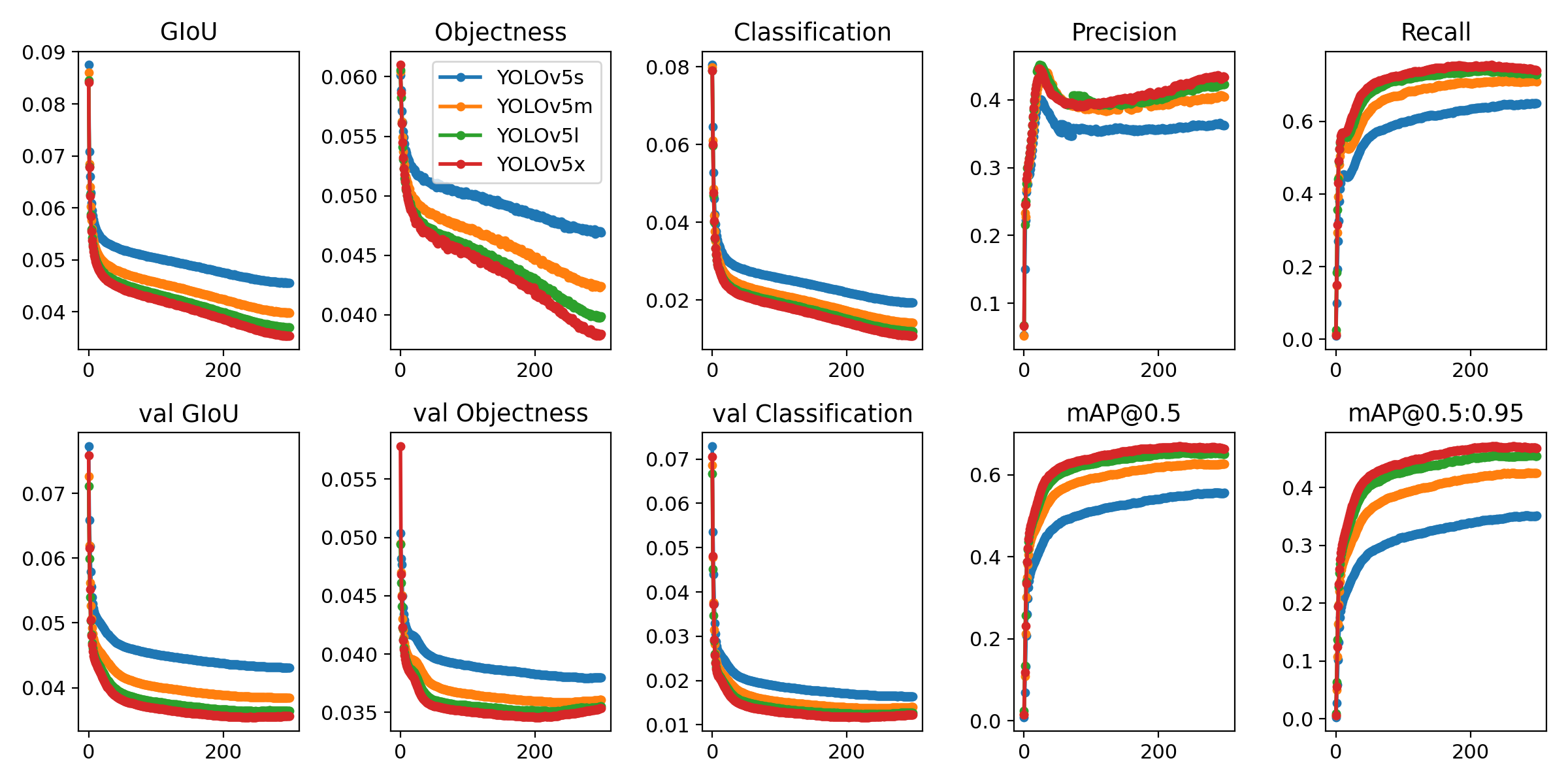
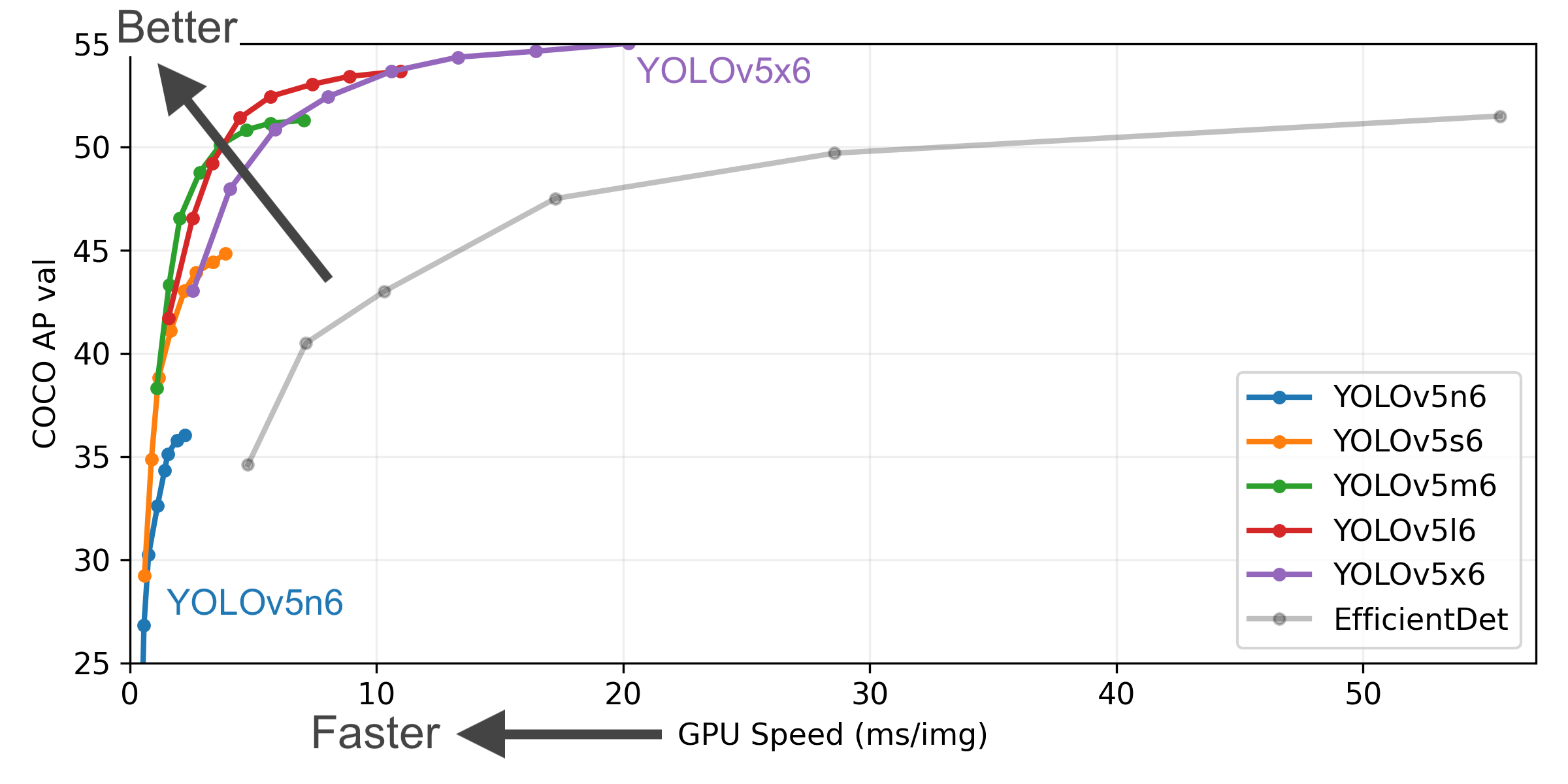
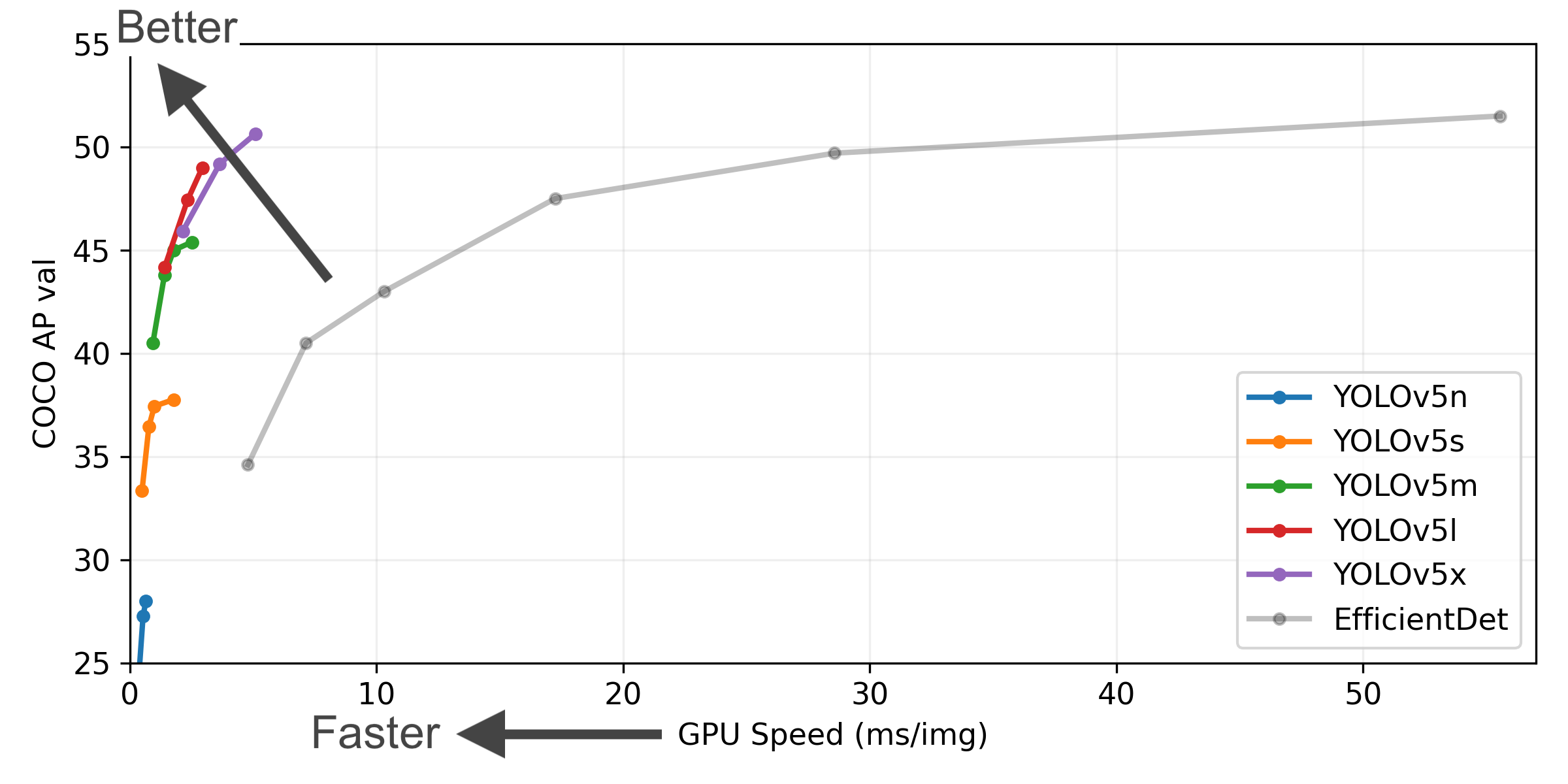
YOLOv5-P5 640 图像 (点击扩展)

图片注释 (点击扩展) - **COCO AP val** 表示 mAP@0.5:0.95 在5000张图像的[COCO val2017](http://cocodataset.org)数据集上,在256到1536的不同推理大小上测量的指标。 - **GPU Speed** 衡量的是在 [COCO val2017](http://cocodataset.org) 数据集上使用 [AWS p3.2xlarge](https://aws.amazon.com/ec2/instance-types/p3/) V100实例在批量大小为32时每张图像的平均推理时间。 - **EfficientDet** 数据来自 [google/automl](https://github.com/google/automl) ,批量大小设置为 8。 - 复现 mAP 方法: `python val.py --task study --data coco.yaml --iou 0.7 --weights yolov5n6.pt yolov5s6.pt yolov5m6.pt yolov5l6.pt yolov5x6.pt`
### 预训练检查点 | Model | size
(pixels) | mAPval
0.5:0.95 | mAPval
0.5 | Speed
CPU b1
(ms) | Speed
V100 b1
(ms) | Speed
V100 b32
(ms) | params
(M) | FLOPs
@640 (B) | |------------------------------------------------------------------------------------------------------|-----------------------|-------------------------|--------------------|------------------------------|-------------------------------|--------------------------------|--------------------|------------------------| | [YOLOv5n](https://github.com/ultralytics/yolov5/releases/download/v6.1/yolov5n.pt) | 640 | 28.0 | 45.7 | **45** | **6.3** | **0.6** | **1.9** | **4.5** | | [YOLOv5s](https://github.com/ultralytics/yolov5/releases/download/v6.1/yolov5s.pt) | 640 | 37.4 | 56.8 | 98 | 6.4 | 0.9 | 7.2 | 16.5 | | [YOLOv5m](https://github.com/ultralytics/yolov5/releases/download/v6.1/yolov5m.pt) | 640 | 45.4 | 64.1 | 224 | 8.2 | 1.7 | 21.2 | 49.0 | | [YOLOv5l](https://github.com/ultralytics/yolov5/releases/download/v6.1/yolov5l.pt) | 640 | 49.0 | 67.3 | 430 | 10.1 | 2.7 | 46.5 | 109.1 | | [YOLOv5x](https://github.com/ultralytics/yolov5/releases/download/v6.1/yolov5x.pt) | 640 | 50.7 | 68.9 | 766 | 12.1 | 4.8 | 86.7 | 205.7 | | | | | | | | | | | | [YOLOv5n6](https://github.com/ultralytics/yolov5/releases/download/v6.1/yolov5n6.pt) | 1280 | 36.0 | 54.4 | 153 | 8.1 | 2.1 | 3.2 | 4.6 | | [YOLOv5s6](https://github.com/ultralytics/yolov5/releases/download/v6.1/yolov5s6.pt) | 1280 | 44.8 | 63.7 | 385 | 8.2 | 3.6 | 12.6 | 16.8 | | [YOLOv5m6](https://github.com/ultralytics/yolov5/releases/download/v6.1/yolov5m6.pt) | 1280 | 51.3 | 69.3 | 887 | 11.1 | 6.8 | 35.7 | 50.0 | | [YOLOv5l6](https://github.com/ultralytics/yolov5/releases/download/v6.1/yolov5l6.pt) | 1280 | 53.7 | 71.3 | 1784 | 15.8 | 10.5 | 76.8 | 111.4 | | [YOLOv5x6](https://github.com/ultralytics/yolov5/releases/download/v6.1/yolov5x6.pt)
+ [TTA][TTA] | 1280
1536 | 55.0
**55.8** | 72.7
**72.7** | 3136
- | 26.2
- | 19.4
- | 140.7
- | 209.8
- |
表格注释 (点击扩展) - 所有检查点都以默认设置训练到300个时期. Nano和Small模型用 [hyp.scratch-low.yaml](https://github.com/ultralytics/yolov5/blob/master/data/hyps/hyp.scratch-low.yaml) hyps, 其他模型使用 [hyp.scratch-high.yaml](https://github.com/ultralytics/yolov5/blob/master/data/hyps/hyp.scratch-high.yaml). - **mAPval** 值是 [COCO val2017](http://cocodataset.org) 数据集上的单模型单尺度的值。
复现方法: `python val.py --data coco.yaml --img 640 --conf 0.001 --iou 0.65` - 使用 [AWS p3.2xlarge](https://aws.amazon.com/ec2/instance-types/p3/) 实例对COCO val图像的平均速度。不包括NMS时间(~1 ms/img)
复现方法: `python val.py --data coco.yaml --img 640 --task speed --batch 1` - **TTA** [测试时数据增强](https://github.com/ultralytics/yolov5/issues/303) 包括反射和比例增强.
复现方法: `python val.py --data coco.yaml --img 1536 --iou 0.7 --augment`
##
贡献
我们重视您的意见! 我们希望给大家提供尽可能的简单和透明的方式对 YOLOv5 做出贡献。开始之前请先点击并查看我们的 [贡献指南](CONTRIBUTING.md),填写[YOLOv5调查问卷](https://ultralytics.com/survey?utm_source=github&utm_medium=social&utm_campaign=Survey) 来向我们发送您的经验反馈。真诚感谢我们所有的贡献者! ##
联系
关于YOLOv5的漏洞和功能问题,请访问 [GitHub Issues](https://github.com/ultralytics/yolov5/issues)。商业咨询或技术支持服务请访问[https://ultralytics.com/contact](https://ultralytics.com/contact)。
[assets]: https://github.com/ultralytics/yolov5/releases [tta]: https://github.com/ultralytics/yolov5/issues/303